Model Parameters
Use editable Python parameters and modular Model Elements to build dynamic, reusable Scopture workflows.
Parameters as a Workflow Interface
Python Model Elements can expose selected source values as controls in Scopture’s Parameters panel. This turns the model’s Python source into a focused interface: a reviewer or designer can adjust the values that define an option without editing the rest of the implementation.
Parameters are most effective when they represent design intent rather than incidental implementation details. Dimensions, clearances, counts, labels, and font choices are good candidates because they can be named, reviewed, and changed independently from the geometry that consumes them.
width = 120
height = 80
wall_thickness = 5
show_fasteners = True
project_label = "North Wing"
FONTS = FontEnum(["Inter", "Roboto"])
When Scopture recognizes these declarations, it presents suitable controls for numeric values, Boolean values, text, and font lists. Boolean literals (True and False) appear as switches. Selecting a Python Model Element exposes its detected parameters in the properties sidebar. Selecting a plot can expose parameters from Python Model Elements nested within that plot, making the plot a practical control surface for the option it presents.
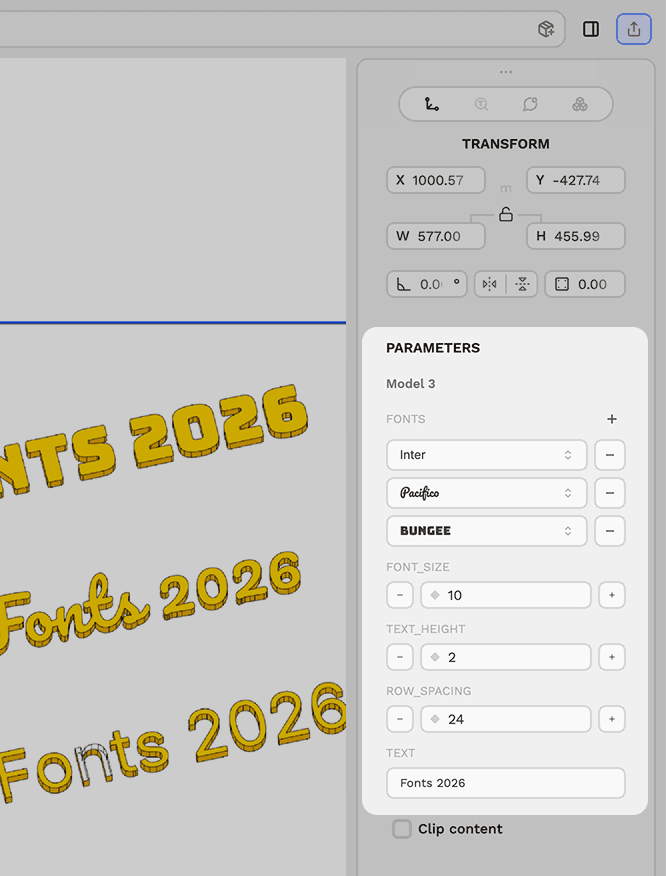
Authoring Detectable Parameters
Keep editable declarations at the top level and assign literal values directly to named variables:
panel_width: float = 120.0
panel_count = 6
show_fasteners: bool = True
system_name = "South facade"
Derive computed values below the editable declarations:
panel_width = 120.0
panel_count = 6

array_width = panel_width * panel_count
The panel is intentionally conservative. Assignments inside functions or classes, comments, docstrings, computed expressions, formatted strings, and complex data structures are not treated as editable parameters. Font collections should use a clearly named top-level list or tuple such as fonts, font_families, or typefaces; FontEnum(...) is also supported.
Parameter edits update the corresponding literal in the Model Element’s Python source, so the code remains the authoritative and portable representation of the design.
Combine Parameters with Modular Models
A strong pattern is to place shared parameters in a logic-only Model Element and import them into one or more rendering elements. The parameter element does not need to display geometry.
# Parameter element ID: mmBUBjTesxYfxL0HDjXWg
width = 120
height = 80
wall_thickness = 5# Rendering element
from duc_model.mmBUBjTesxYfxL0HDjXWg import width, height, wall_thickness
from build123d import Box
wall = Box(width, wall_thickness, height)
emit_output(wall, kind="parametric")When a shared value changes, Scopture marks dependent output as stale. With execution available, it regenerates the model cache, saves the output artifact, and updates the thumbnail in the background. Desktop uses its native Python sandbox for both local and remote drawings; browser and mobile use the authorized paid cloud sandbox. See Python Sandbox for execution contexts, available packages and runtime limits. A parameter module can therefore drive several coordinated views or assemblies.
A current saved artifact can be displayed when a drawing reopens without executing its Python again. The declared output selects the viewer, so the same Model Element can produce CAD, DXF, an image, SVG, PDF, or a table. See Model Elements for emit_output(...) and the stored output contract.
Use the model import completion list in the Python editor to insert the stable module reference. The visible model label helps identify the source, while the element ID provides the durable reference used by the import.
For the underlying module identity, import forms, remapping behavior, and dependency-graph contract, see Model Element Modularization in the Duc documentation.
Recommended Workflow
- Create a Python Model Element for the values that should be editable.
- Declare those values as simple numeric, boolean, text, or font-list literals.
- Import the values from
duc_model.<model-element-id>in the elements that consume them. - Call
emit_output(...)once in the rendering root. Parameter and helper modules should expose their values and functions. - Select the parameter element or its containing plot and iterate from the Parameters panel.
This structure keeps the editable interface small, the Python implementation modular, and the downstream effects of each design change explicit.
Last updated on